Media Storage Architecture
Inherited from the Winter 2026 team. On October 7, 2026 we corrected the facts on this page to match the code on main. We added PDF exports, image delete, local S3, and the KML staging bucket.
This document describes how images are uploaded, stored, and retrieved in the SAPAA SIR system.
The goal is to help future development teams understand how media files flow through the system and how AWS S3 is used.
Overview
Images uploaded through the SAPAA application are stored in AWS S3, while their metadata is stored in the Supabase PostgreSQL database.
The system uses presigned URLs so that users upload files directly to S3 instead of routing large files through the application server.
The same bucket also holds the PDF exports. See PDF export path.
KML/KMZ imports are staged in Supabase Storage (bucket kml-imports), not S3. See Other storage.
This approach improves:
- performance
- scalability
- security
High-Level Architecture
Image Upload Architecture
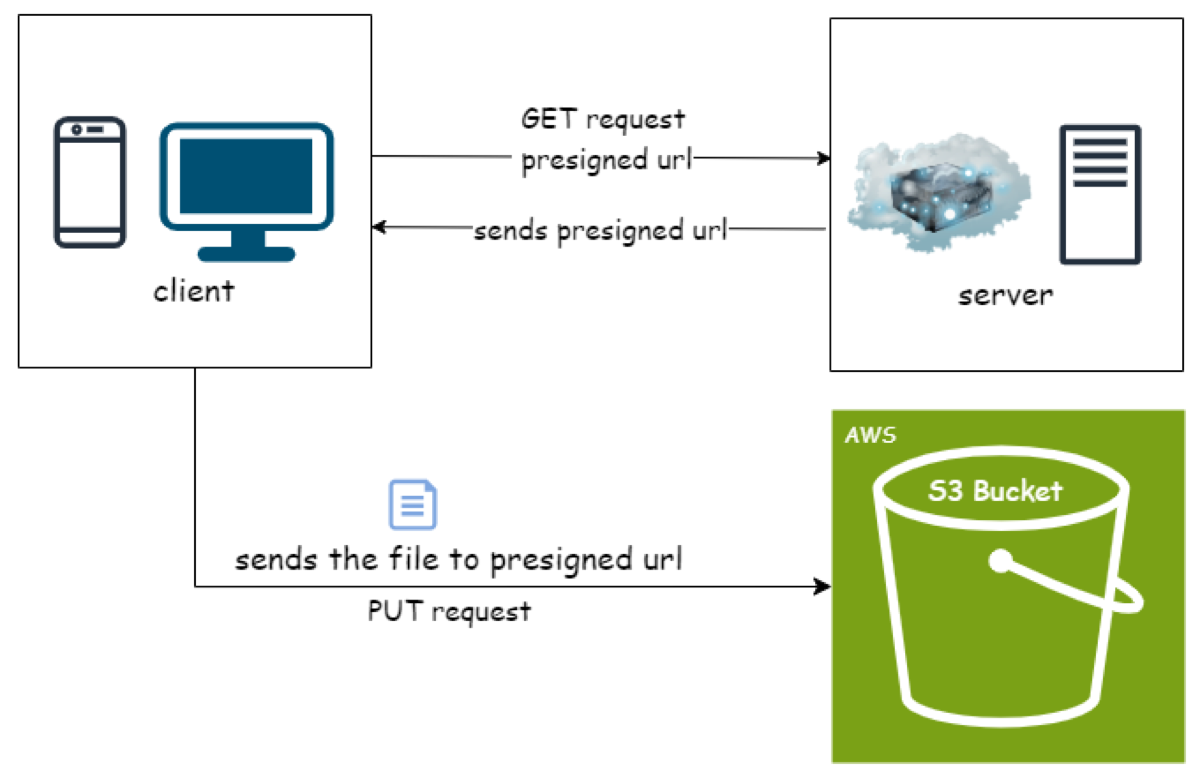
Image Download Architecture
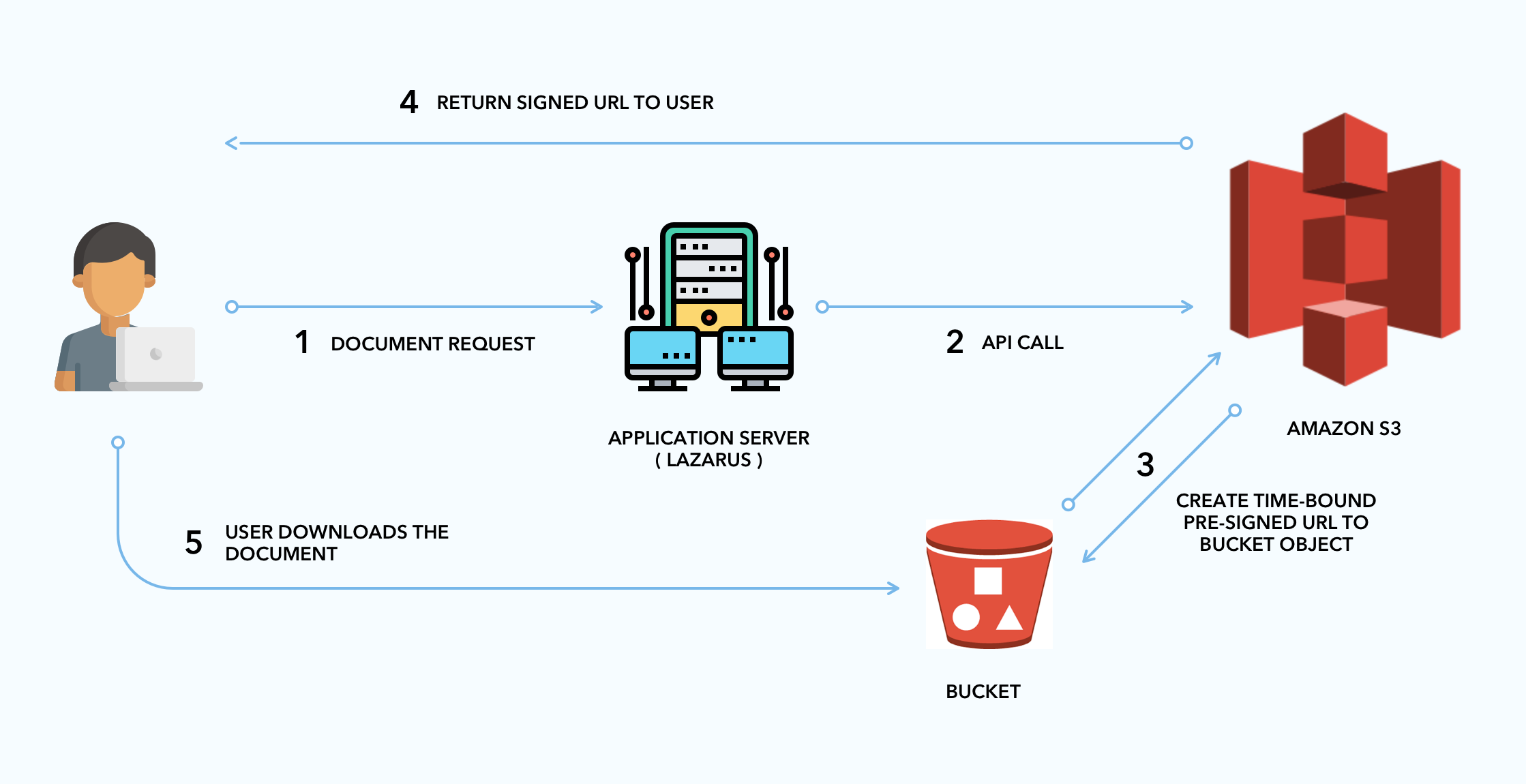
Image Upload Flow
Step 1 – User selects an image
A user uploads an image through:
- a Site Inspection Report (SIR) image upload flow, or
- the Standalone Homepage Image Upload flow
The user may enter metadata such as:
- caption
- identifier
- photographer
- date
- site name
Step 2 – Client requests a presigned upload URL
The frontend uses different endpoints depending on the upload source:
For SIR image uploads
POST /api/s3/presign
Request data includes:
- filename
- contentType
- fileSize
- siteId
- responseId
- questionId
- siteName
- date
- identifier
- photographer
For standalone homepage image uploads
POST /api/s3/presign-homepage-images
Request data includes:
- contentType
- fileSize
- siteId
- siteName
- date
- photographer
- identifier
Both APIs validate:
- user authentication
- file size
- allowed file types
- required metadata
S3 Storage Structure
Images are stored in the S3 bucket: sapaa-inspection-images
S3 object keys differ by upload source.
SIR upload path
inspections/{siteId}/{responseId}/{questionId}/{generatedFilename}
Example:
inspections/207/3235/27/Riverlot56NA-2026-01-31-RaiyanaRahman-SkiTrails-aa05346a.jpg
Standalone homepage upload path
homepage-image-uploads/{siteId}/{userId}/{generatedFilename}
Example:
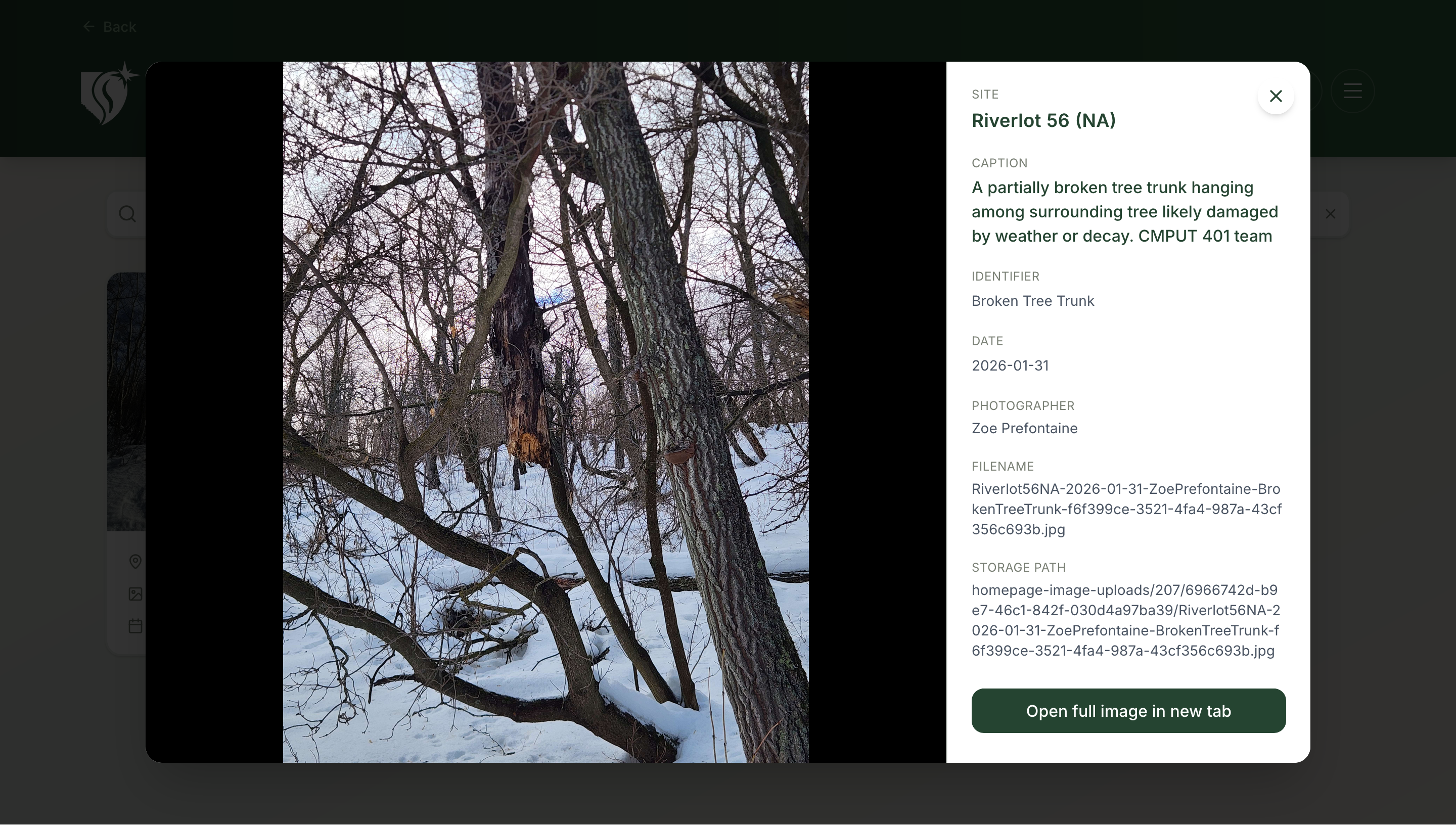
homepage-image-uploads/207/6966742d-b9e7-46c1-842f-030d4a97ba39/Riverlot56NA-2026-01-31-ZoePrefontaine-BrokenTreeTrunk-f6f399ce-3521-4fa4-987a-43cf356c693b.jpg
PDF export path
pdf-exports/{userId}/{jobId}/{filename}
POST /api/pdf creates a row in the S26_pdf_jobs table and starts the job with after(). The job (lib/pdf/processPdfJob.ts) reads the inspection images from S3 with signed GET URLs, builds the PDF, and writes it to this key with content type application/pdf. The job stores the key in S26_pdf_jobs.storage_path. GET /api/pdf/status/{jobId} returns a signed download URL when the job status is complete.
Why a generated unique suffix is added
The generated filename includes a unique suffix so that even if two images share the same metadata, file collisions are avoided.
This ensures files are not overwritten while still preserving human-readable metadata in the filename.
Database Metadata Storage
SIR image metadata table
Image metadata for SIR uploads is stored in attachments.
| Field | Description |
|---|---|
| id | Attachment ID |
| site_id | Associated site |
| response_id | Associated SIR response |
| question_id | Question the image belongs to |
| filename | SAPAA formatted filename |
| storage_key | S3 object key |
| caption | Image caption |
| identifier | Image identifier |
| file_size_bytes | File size |
| content_type | MIME type |
Standalone homepage image metadata table
Image metadata for standalone homepage uploads is stored in homepage_image_uploads.
| Field | Description |
|---|---|
| id | Homepage image record ID |
| site_id | Associated site |
| user_id | Uploading user |
| date | Image date |
| photographer | Photographer name |
| identifier | Image identifier |
| caption | Image caption |
| filename | SAPAA formatted filename |
| storage_key | S3 object key |
| file_size_bytes | File size |
| content_type | MIME type |
Gallery API Endpoints
This section documents the API endpoints used to retrieve uploaded images and their metadata.
Images are stored in AWS S3 while metadata is stored in the Supabase PostgreSQL database.
These endpoints generate temporary signed URLs so that images can be securely accessed by authenticated users.
API Access Control
Some API endpoints in the SAPAA system are restricted based on user roles.
In particular, the gallery administration endpoint is only accessible to users with the admin role.
Admin-only Endpoints
GET /api/gallery
This endpoint returns all uploaded SIR image attachments across all sites along with their associated metadata and signed image URLs.
Because this endpoint exposes all media files and metadata in the system, it is protected with a server-side authorization check.
Access Level
Only approved admins can access this endpoint: app_metadata.role = 'admin' and app_metadata.authenticated = true.
Authorization Logic
When a request is received, the server:
- Retrieves the currently authenticated user using Supabase authentication.
- Returns 401 Unauthorized if there is no signed-in user.
- Reads
roleandauthenticatedfrom the user'sapp_metadata. - Returns 403 Forbidden unless
roleisadminandauthenticatedistrue.
Response
Returns a JSON object containing a list of images and their metadata.
Example response:
{
  "items": [
    {
      "id": 14,
      "response_id": 3235,
      "question_id": 27,
      "caption": "Cross Country ski trails",
      "identifier": "Ski Trails",
      "date": "2026-01-31",
      "filename": "Riverlot56NA-2026-01-31-RaiyanaRahman-SkiTrails-aa05346a.jpg",
      "content_type": "image/jpeg",
      "file_size_bytes": 506701,
      "storage_key": "inspections/207/3235/27/Riverlot56NA-2026-01-31-RaiyanaRahman-SkiTrails-aa05346a.jpg",
      "site_id": 207,
      "site_name": "Riverlot 56 (NA)",
      "imageUrl": "https://sapaa-inspection-images.s3.ca-central-1.amazonaws.com/..."
    }
  ]
}
GET /api/homepage-images
Returns all standalone homepage image uploads with metadata and signed image URLs.
Access Level
Approved admins only: app_metadata.role = 'admin' and app_metadata.authenticated = true.
Response Format
{
  "items": [
    {
      "id": 16,
      "site_id": 207,
      "site_name": "Riverlot 56 (NA)",
      "date": "2026-01-31",
      "photographer": "Raiyana Rahman",
      "caption": "Cross Country ski trails",
      "identifier": "Ski Trails",
      "filename": "Riverlot56NA-2026-01-31-RaiyanaRahman-SkiTrails-0642088a-b29f-400a-9ce7-e1003fa1e928.jpg",
      "file_size_bytes": 506701,
      "storage_key": "homepage-image-uploads/207/user-id/Riverlot56NA-2026-01-31-RaiyanaRahman-SkiTrails-0642088a-b29f-400a-9ce7-e1003fa1e928.jpg",
      "imageUrl": "https://sapaa-inspection-images.s3.ca-central-1.amazonaws.com/..."
    }
  ]
}
GET /api/homepage-images/{siteId}
Returns standalone homepage image uploads for a specific site.
Access Level
Authenticated users. The handler checks only that a user is signed in. It has no role check. It is not clear if this endpoint must be admin-only. This is reported to Beta (route auth checks).
Path Parameters
| Parameter | Type | Required | Description |
|---|---|---|---|
siteId |
integer | Yes | Site ID |
Response
{
  "items": [
    {
      "id": 16,
      "site_id": 207,
      "site_name": "Riverlot 56 (NA)",
      "date": "2026-01-31",
      "photographer": "Raiyana Rahman",
      "caption": "Cross Country ski trails",
      "identifier": "Ski Trails",
      "filename": "Riverlot56NA-2026-01-31-RaiyanaRahman-SkiTrails-0642088a-b29f-400a-9ce7-e1003fa1e928.jpg",
      "file_size_bytes": 506701,
      "storage_key": "homepage-image-uploads/207/user-id/Riverlot56NA-2026-01-31-RaiyanaRahman-SkiTrails-0642088a-b29f-400a-9ce7-e1003fa1e928.jpg",
      "imageUrl": "https://sapaa-inspection-images.s3.ca-central-1.amazonaws.com/..."
    },
    {
      "id": 21,
      "site_id": 207,
      "site_name": "Riverlot 56 (NA)",
      "date": "2026-01-31",
      "photographer": "Zoe Prefontaine",
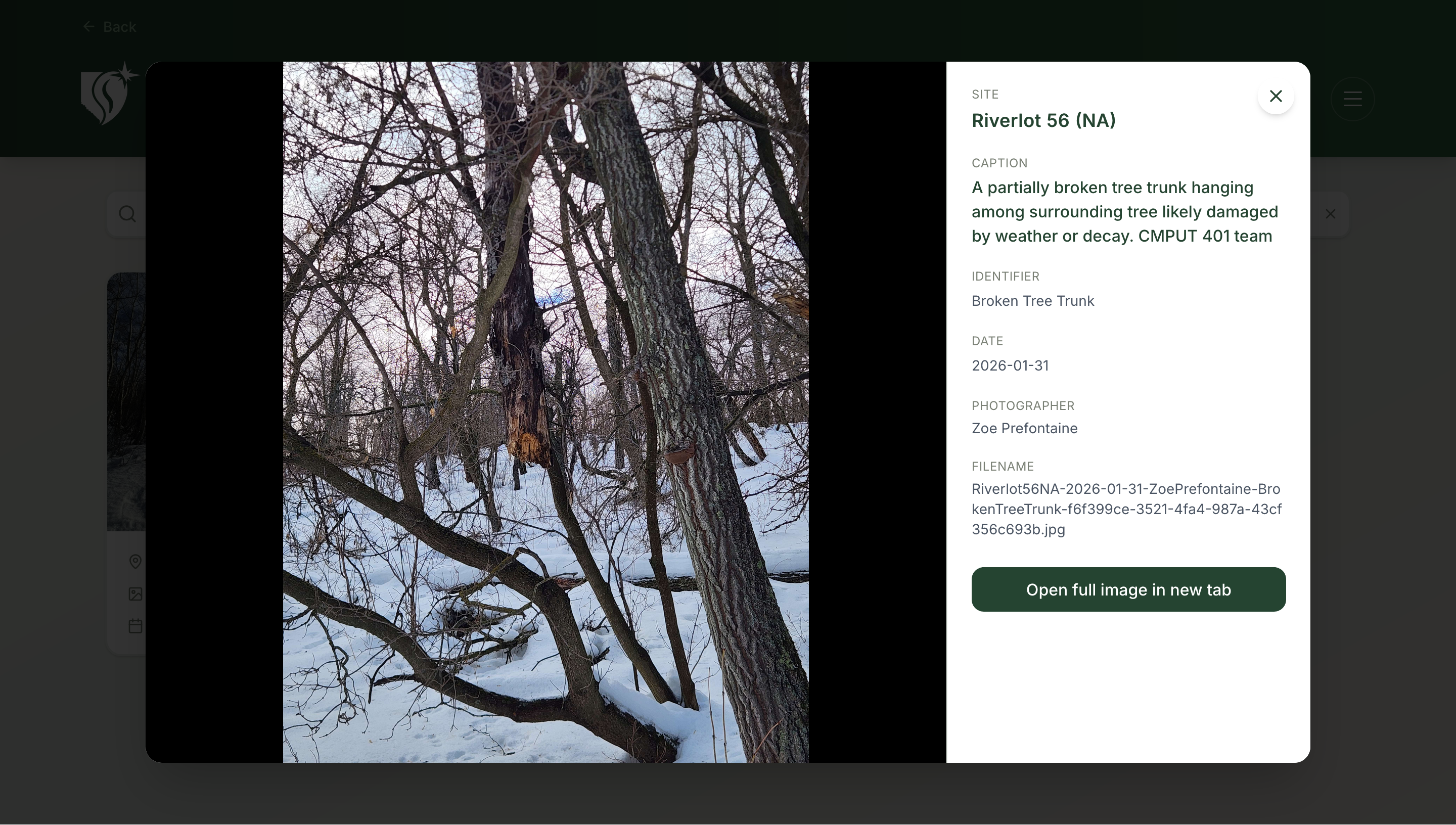
      "caption": "A partially broken tree trunk hanging among surrounding tree likely damaged by weather or decay. CMPUT 401 team",
      "identifier": "Broken Tree Trunk",
      "filename": "Riverlot56NA-2026-01-31-ZoePrefontaine-BrokenTreeTrunk-f6f399ce-3521-4fa4-987a-43cf356c693b.jpg",
      "file_size_bytes": 1852012,
      "storage_key": "homepage-image-uploads/207/user-id/Riverlot56NA-2026-01-31-ZoePrefontaine-BrokenTreeTrunk-f6f399ce-3521-4fa4-987a-43cf356c693b.jpg",
      "imageUrl": "https://sapaa-inspection-images.s3.ca-central-1.amazonaws.com/..."
    }
  ]
}
Authentication based endpoint
GET /api/sites/{siteId}/gallery
Returns SIR image attachments associated with a specific site.
This endpoint allows authenticated users to retrieve media files linked to a site inspection or site record.
Access Level
Authenticated users only.
Unlike /api/gallery, which is restricted to administrators, this endpoint allows normal users to view images associated with sites they have access to.
Response
Returns a JSON object containing a list of images and their metadata.
Example response:
{
  "items": [
    {
      "id": 14,
      "caption": "Cross Country ski trails",
      "identifier": "Ski Trails",
      "filename": "Riverlot56NA-2026-01-31-RaiyanaRahman-SkiTrails-aa05346a.jpg",
      "file_size_bytes": 506701,
      "site_name": "Riverlot 56 (NA)",
      "response_id": 3235,
      "imageUrl": "https://sapaa-inspection-images.s3.ca-central-1.amazonaws.com/..."
    }
  ]
}
GET /api/site-images
Returns image attachments associated with a site or inspection response.
Images are stored in AWS S3 while metadata is stored in the Supabase database.
This endpoint generates temporary signed URLs that allow images to be securely viewed.
Access Level
Authenticated users only.
The server verifies that the requester is logged in before returning any image metadata.
Query Parameters
| Parameter | Type | Required | Description |
|---|---|---|---|
siteid |
integer | No | Filters images belonging to a specific site |
responseid |
integer | No | Filters images belonging to a specific inspection response |
At least one parameter must be provided.
Example Requests
Retrieve images for a site: /api/site-images?siteid=207
Retrieve images for an inspection response: /api/site-images?responseid=3235
Retrieve images filtered by both: /api/site-images?siteid=207&responseid=3235
Response Format
Returns a JSON object containing an array of images.
Example:
{
  "items": [
    {
      "id": 14,
      "response_id": 3235,
      "question_id": 27,
      "filename": "Riverlot56NA-2026-01-31-RaiyanaRahman-SkiTrails-aa05346a.jpg",
      "storage_key": "inspections/207/3235/27/Riverlot56NA-2026-01-31-RaiyanaRahman-SkiTrails-aa05346a.jpg",
      "content_type": "image/jpeg",
      "file_size_bytes": 506701,
      "caption": "Cross Country ski trails",
      "identifier": "Ski Trails",
      "site_id": 207,
      "imageUrl": "https://sapaa-inspection-images.s3.ca-central-1.amazonaws.com/..."
    }
  ]
}
GET /api/user-gallery/homepage-upload
Returns all standalone homepage image uploads with metadata and signed S3 URLs, ordered by date descending.
Access Level
Authenticated users only.
Unlike /api/homepage-images, which is restricted to administrators, this endpoint allows all authenticated users to retrieve homepage image uploads.
Response
Returns a JSON object containing a list of images and their metadata.
Example response:
{
  "items": [
    {
      "id": 16,
      "site_id": 207,
      "site_name": "Riverlot 56 (NA)",
      "date": "2026-01-31",
      "photographer": "Raiyana Rahman",
      "caption": "Cross Country ski trails",
      "identifier": "Ski Trails",
      "filename": "Riverlot56NA-2026-01-31-RaiyanaRahman-SkiTrails-0642088a-b29f-400a-9ce7-e1003fa1e928.jpg",
      "file_size_bytes": 506701,
      "imageUrl": "https://sapaa-inspection-images.s3.ca-central-1.amazonaws.com/..."
    }
  ]
}
GET /api/user-gallery/sir-upload
Returns all SIR inspection image attachments (JPEG, PNG, WebP) across all sites with resolved site names and signed S3 URLs, ordered by ID descending.
Access Level
Authenticated users only.
Unlike /api/gallery, which is restricted to administrators, this endpoint allows all authenticated users to retrieve SIR inspection images across all sites.
Response
Returns a JSON object containing a list of images and their metadata.
Example response:
{
  "items": [
    {
      "id": 14,
      "response_id": 3226,
      "question_id": 27,
      "caption": "Cross Country ski trails",
      "identifier": "Ski Trails",
      "date": "2026-01-31",
      "content_type": "image/jpeg",
      "file_size_bytes": 506701,
      "filename": "Riverlot56NA-2026-01-31-RaiyanaRahman-SkiTrails-aa05346a.jpg",
      "site_id": 207,
      "site_name": "Riverlot 56 (NA)",
      "imageUrl": "https://sapaa-inspection-images.s3.ca-central-1.amazonaws.com/..."
    }
  ]
}
Delete flow
DELETE /api/site-images?id={id}&kind={kind}
Deletes one image. kind is attachments (default) or homepage_image_uploads.
Access Level
Approved admins only: app_metadata.role = 'admin' and app_metadata.authenticated = true.
Order of operations
- The handler reads the row to get its
storage_key. - The handler deletes the database row.
- The handler deletes the S3 object with
deleteObjectsByKeys(utils/media/s3Delete.ts,DeleteObjectsCommand, up to 1000 keys per request).
The database row is deleted first and the S3 object second.
SIR rollback
rollbackSiteInspectionSubmission in utils/supabase/queries.ts also calls deleteObjectsByKeys. When an SIR submission fails, it removes the S3 objects that were uploaded for it.
Security Model
The system protects images using several mechanisms:
Authentication
Only authenticated users can:
- upload images
- request presigned URLs
Private S3 bucket
The S3 bucket is not publicly accessible.
Images are accessed through temporary signed URLs. The server generates temporary signed URLs for each image using AWS S3. These URLs expire after 1 hour, preventing public access to stored images.
Signed URLs
Two types of signed URLs are used:
| Type | Purpose |
|---|---|
| Upload URL | Allows client to upload file to S3 |
| Download URL | Allows temporary viewing of image or PDF |
Upload URL: 3 minutes. Download URL: 1 hour.
Why Direct S3 Uploads Are Used
Uploading files directly to S3 provides several benefits:
Performance
Large files do not pass through the application server.
Scalability
The backend does not become a bottleneck when many users upload images.
Security
The server validates requests before issuing upload permissions.
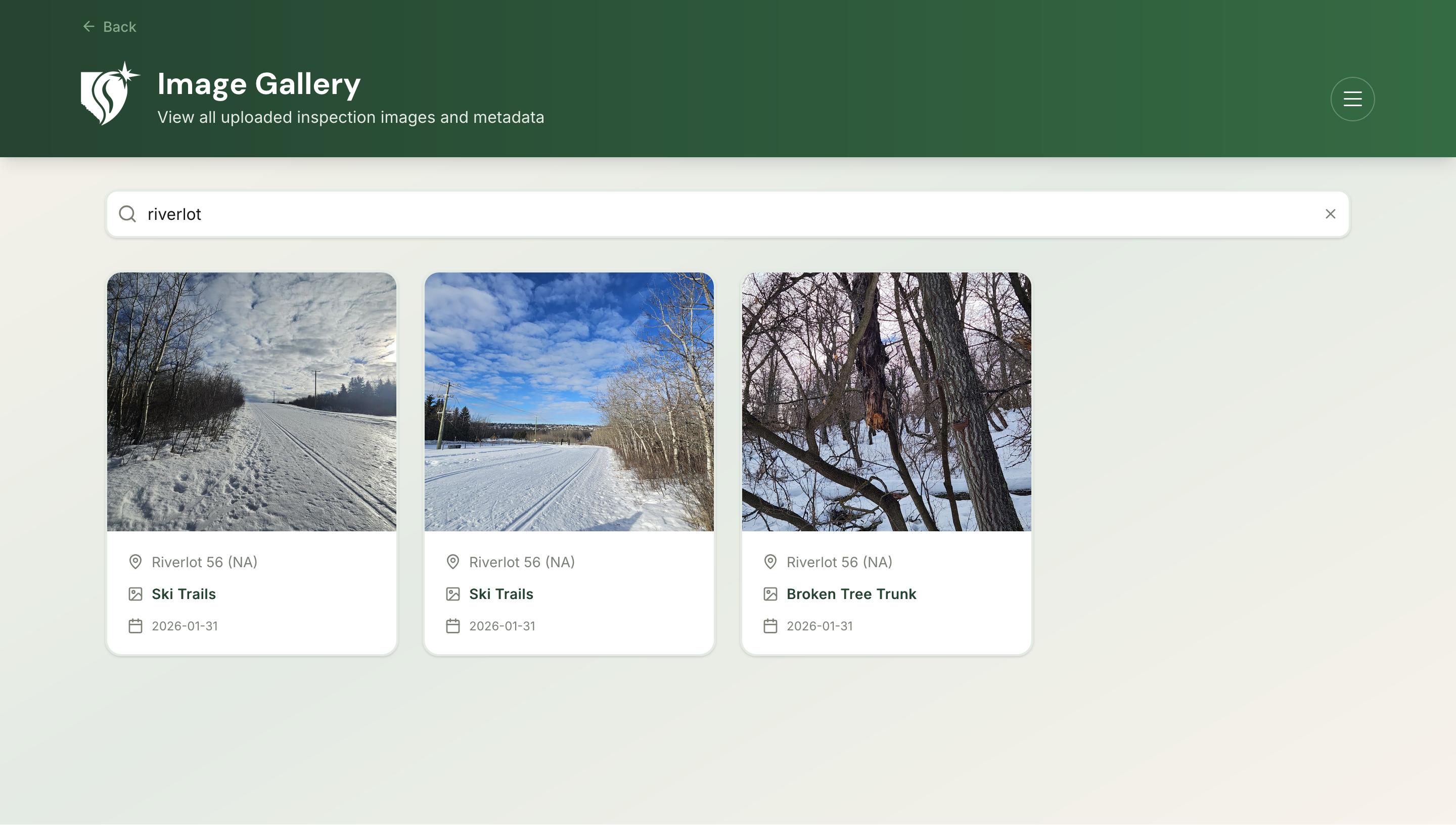
Admin Gallery
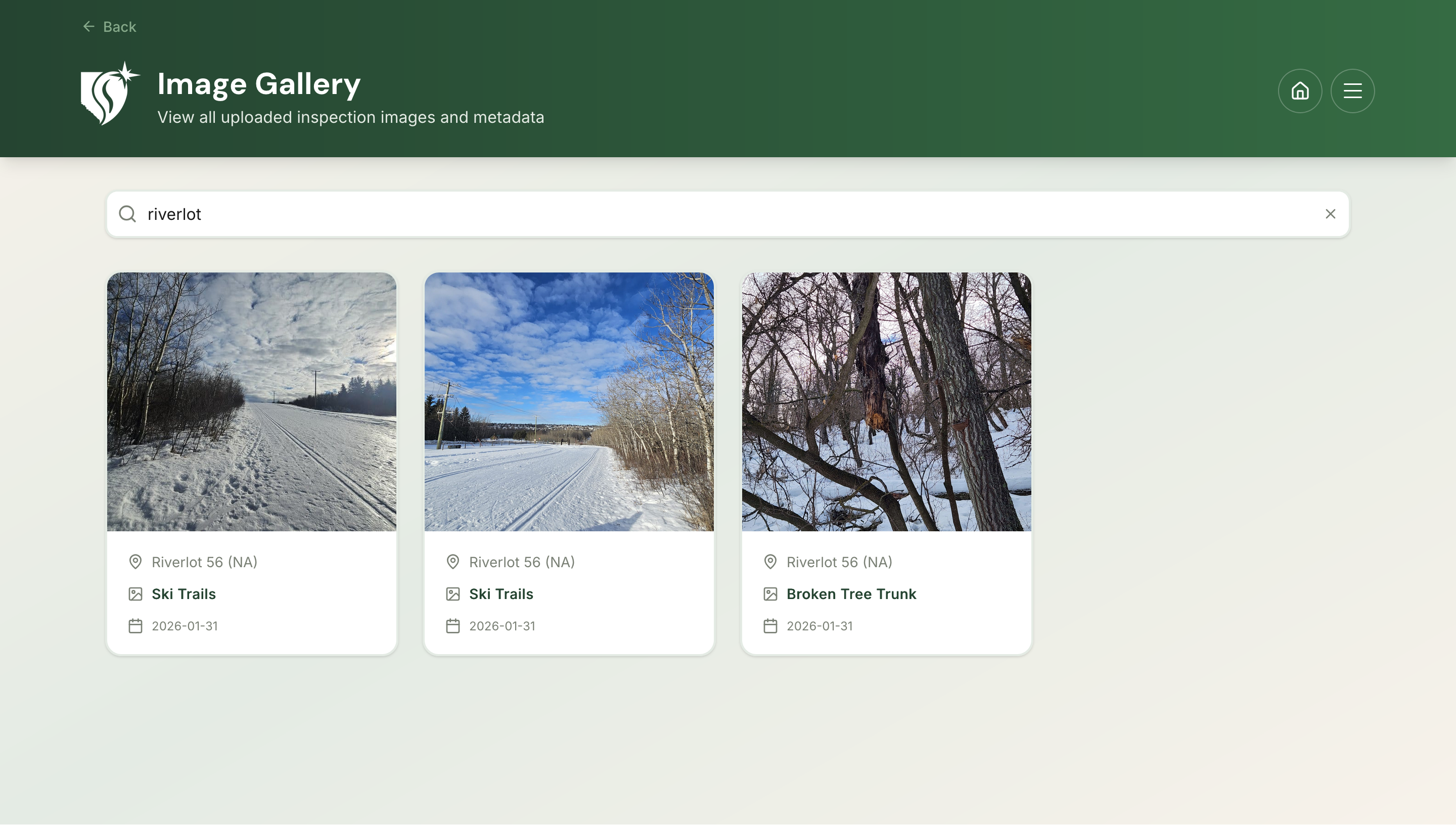
Admins can view all uploaded images through the gallery interface.
Features include:
- viewing SIR inspection images across all sites
- viewing standalone homepage-uploaded images
- viewing metadata such as storage path, captions, identifiers, filenames, and dates
- images are displayed using signed S3 URLs generated by the server
User Gallery
Authenticated users can view uploaded images through the user gallery interface.
Features include:
- viewing SIR inspection images across all sites
- viewing standalone homepage-uploaded images
- viewing metadata such as captions, identifiers, filenames, and dates
- images are displayed using signed S3 URLs generated by the server
Unlike the Admin Gallery, the user gallery does not expose storage paths beyond what is embedded in the filename.
Related API Endpoints
| Endpoint | Purpose |
|---|---|
/api/s3/presign |
Generate S3 upload URL for SIR image uploads |
/api/s3/presign-homepage-images |
Generate S3 upload URL for standalone homepage image uploads |
/api/gallery |
Retrieve all SIR uploaded images |
/api/site-images |
Retrieve SIR images for a site and/or inspection response |
/api/sites/{siteId}/gallery |
Retrieve SIR images for a specific site |
/api/homepage-images |
Retrieve all standalone homepage images |
/api/homepage-images/{siteId} |
Retrieve standalone homepage images for a specific site |
/api/user-gallery/homepage-upload |
Retrieve all standalone homepage images |
/api/user-gallery/sir-upload |
Retrieve all SIR inspection images |
DELETE /api/site-images |
Delete one image row and its S3 object (approved admins) |
POST /api/pdf |
Start a PDF export job (approved admins) |
GET /api/pdf/status/{jobId} |
Get the job status and a signed download URL |
Local development
npm run dev in webapp/ runs scripts/local_supabase.js. In development the app does not use the AWS bucket in ca-central-1. It uses a LocalStack bucket:
scripts/local_s3.jsstarts LocalStack through thelstkCLI.- It creates the bucket
AWS_S3_BUCKET_NAME(defaultsapaa-inspection-images) athttp://s3.localhost.localstack.cloud:4566, regionus-east-1, with test credentials. - It sets open CORS rules (all origins; GET, PUT, HEAD, DELETE).
- It uploads seed images under
seed/ducks/. - It starts
next devwithAWS_ENDPOINT_URL_S3set to the LocalStack endpoint. The route S3 clients set no endpoint, so the AWS SDK reads this variable.
The production bucket is private. Only the local bucket has open CORS.
Other storage
Admin KML/KMZ uploads (US 6.0.1) do not use S3. The browser uploads the file to the private Supabase Storage bucket kml-imports (50 MiB limit). Its RLS policies allow insert, select, and delete only for approved admins. The server action importProtectedAreasFromStorage in utils/kml-import-actions.ts downloads the file with the service role, upserts the protected_areas table, and removes the staged file.
Summary
The SAPAA SIR system stores images in AWS S3 while maintaining metadata in Supabase.
Key features of the architecture include:
- direct client uploads using presigned URLs
- structured storage paths
- standardized file naming
- secure private storage
- scalable image retrieval
This architecture allows SAPAA to efficiently store and organize large numbers of inspection images while maintaining strong security and performance.